Nervión
A free music font for Sibelius, remapped from Punzón
About
Nervión is a free music font for Sibelius, remapped from Punzón onto Sibelius's own font-mapping scheme.
Like Punzón, it draws on Spanish music engraving, especially Casa Dotésio — the Bilbao-founded publisher that grew into Spain's dominant music printer in the early 1900s before being renamed Unión Musical Española in 1914.
It's named for the Nervión, the river that flows through Bilbao into the Cantabrian Sea — the same city where Casa Dotésio began.
Sibelius edition requirement: Nervión needs Sibelius Ultimate for full font support. Sibelius First cannot edit music fonts at all, and Sibelius Artist's font editing is limited — see Installation for details before downloading.
Nervión is developed and maintained by Mikko Patama. You can support the project by buying him a coffee or contributing on GitHub.
Nervión is released under the SIL Open Font License, Version 1.1, matching Punzón's license.
Font family
Sibelius splits a music font into several companion files, each covering a different role. Nervión currently includes:
NervionStd.otfMain notation glyphs — noteheads, clefs, accidentals, rests, flags, time and key signatures.NervionTextStd.otfMusic glyphs used inline with text — dynamics such as ff and mf, and other symbols embedded in text objects.NervionSpecialStd.otfLess common notation elements outside the core symbol set.NervionOrnamentsStd.otfTrills, turns, mordents, and other ornament figures.NervionMetronomeStd.otfGlyphs used for metric modulation text.
PDF Sample
Download
macOS: click each font file to open Font Book. Windows: double-click each file and choose "Install."
Installation
Before installing: confirm your Sibelius edition. Sibelius Ultimate supports the full setup below. Sibelius Artist can only import a pre-built house style with the font already configured — it cannot set up font substitutions itself. Sibelius First cannot use custom music fonts at all.
- Install the font files.
macOS: click each ofNervionStd.otf,NervionTextStd.otf,NervionSpecialStd.otf,NervionMetronomeStd.otf, andNervionOrnamentsStd.otfto open Font Book, then click "Install" to install system-wide. Or copy the files manually into:macOS: /Library/Fonts/
Windows: C:\Windows\Fonts - Start Sibelius and go to File → Preferences → Music Fonts.
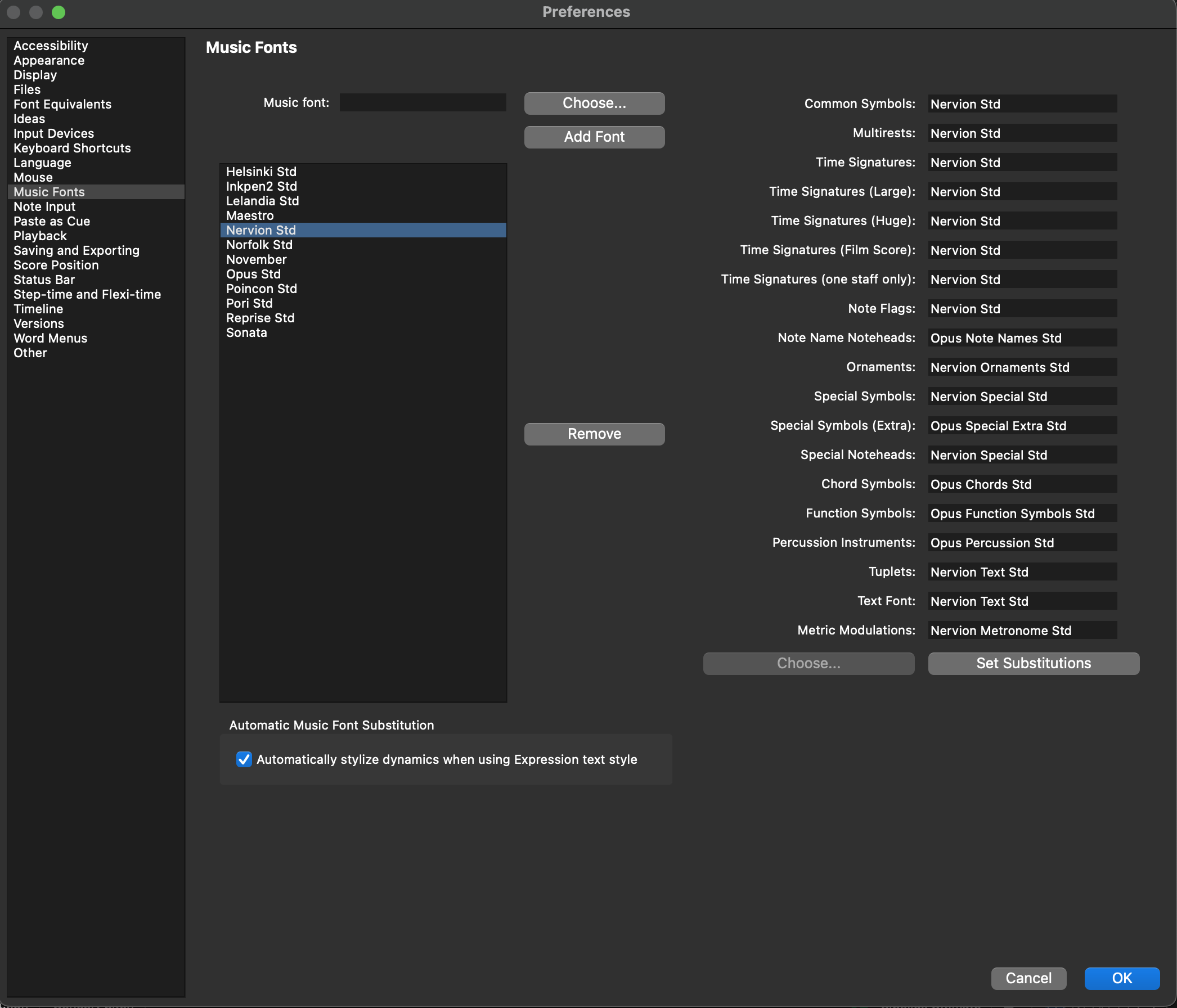
- Click "Choose…" next to "Music font:" and select Nervión Std. Click "Add Font" to add it to the music font list.
- Select Nervión Std in the list. Copy the substitution settings shown below, then click "Set Substitutions" and close the Preferences window.
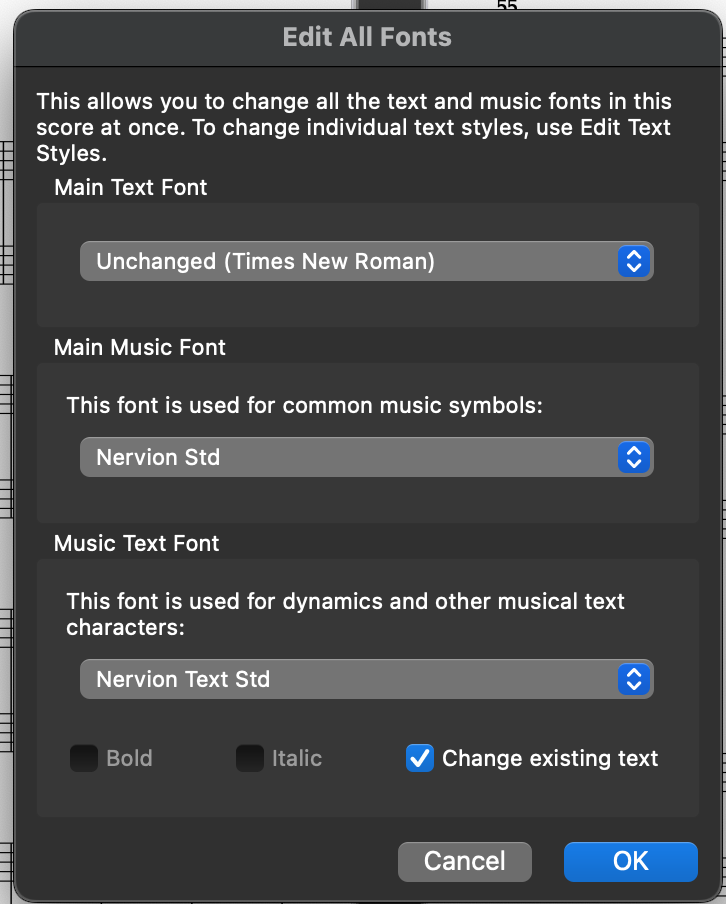
- In the "Command Search" box at the top right, type "Edit All Fonts". Choose Nervión Std as the Main Music Font and Nervión Text Std as the Music Text Font, then click OK.
Full instructions and version history are also kept on the GitHub page.
Credits and acknowledgements
Created by Mikko Patama. Letterforms drawn from Punzón.
Glyphs not yet mapped fall back to Bravura by Steinberg Media Technologies GmbH.
Sibelius has no official published specification for its font-mapping scheme; Nervión's mapping was reconstructed following the same approach used for Poinçon, Eugene's Sibelius sibling.